Workflows
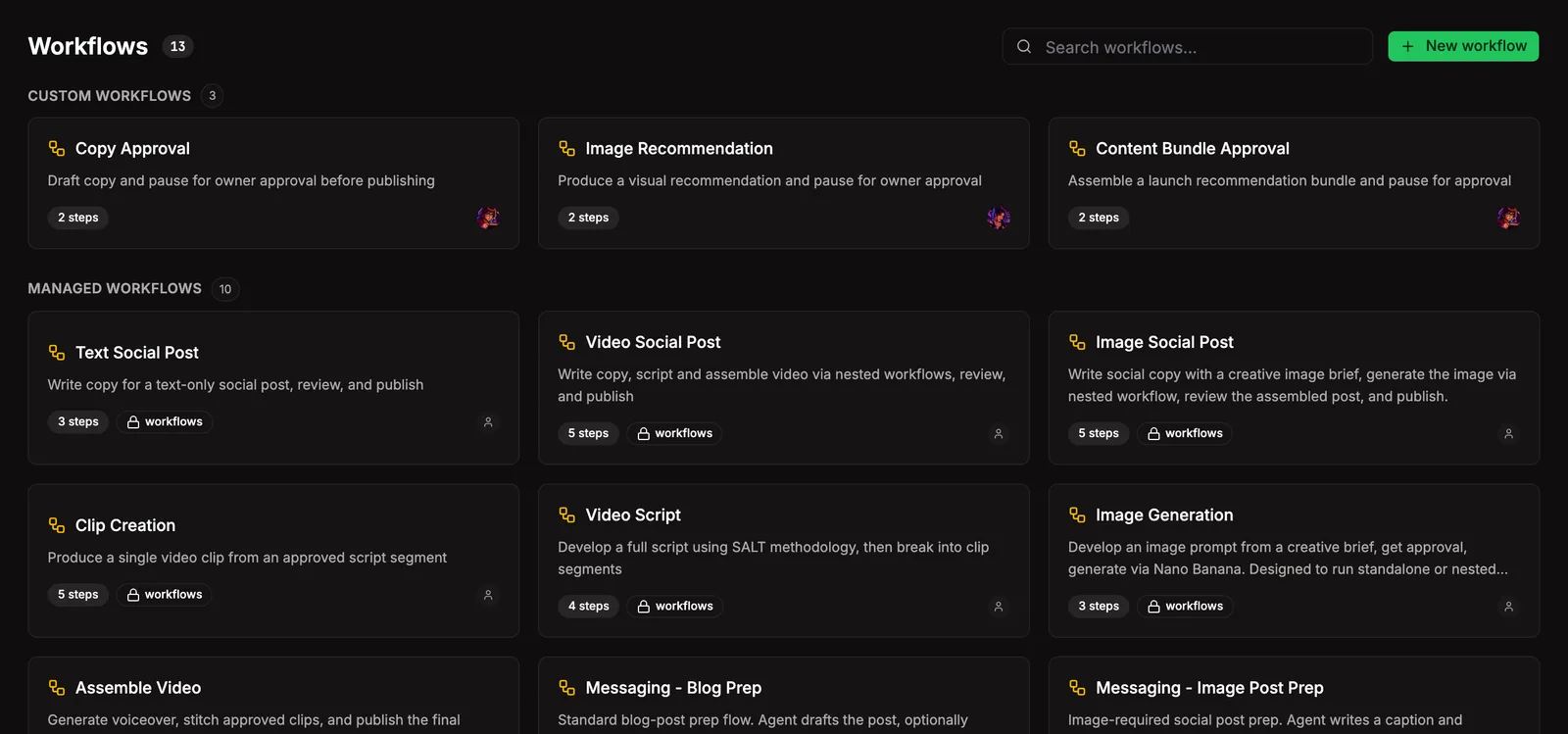
Rails when your agents need them. A workflow is an ordered recipe of steps that get worked one at a time, with explicit support for approval gates, parallel agent work, sub-workflows, and final outputs. Use them when order matters: review before publish, validation before commit, multi-step jobs you don’t want an agent freestyling on.
Workflows attach to tasks. When an agent creates a task it picks the workflow that fits, or skips with a reason. You can change the call later from the task’s detail panel: swap workflows, attach one, or detach.
Canvas
Section titled “Canvas”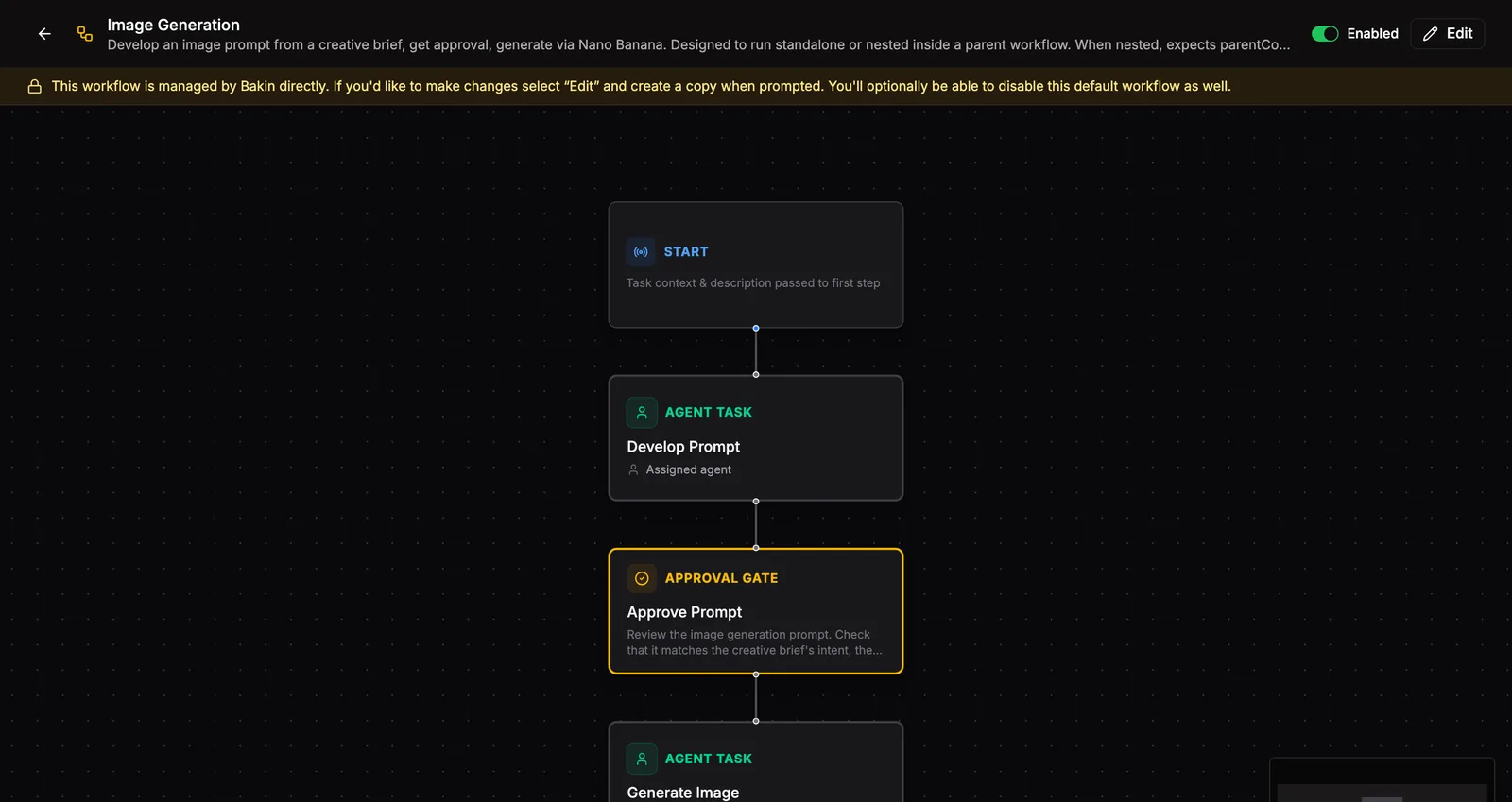
Open any workflow to see its recipe on the canvas. Steps stack top to bottom in runtime order; edges show the supported flow between those steps. A Start card up top summarizes the inputs. Each step shows its type, label, and the agent that runs it. Click any step to look inside: who owns it, what it depends on, what it expects to output, where it routes on approve or reject.
Same surface for building. No second editor to learn.
A workflow is any number of ordered steps. Every step has a type:
- Agent step: an agent runs the work. Output gets validated against a schema before the workflow advances.
- Gate: pauses for your approval before moving on. Optional notifications, configurable approve and reject paths.
- Parallel: groups agent child steps that run side by side. The workflow waits for every child to finish before it continues.
- Output: the terminal step. Optionally publishes the final result to channels like Discord, Slack, or email. Channel posting is allowed only from the active output owner.
- Sub-workflow: runs another workflow inline, with its own task on the board so you can watch it move.
Managing workflows
Section titled “Managing workflows”Build a workflow
Section titled “Build a workflow”+ New Workflow puts the canvas in build mode. Drag steps from the palette, wire them together, click any step to configure it. Save and the workflow’s available to attach to any task.
Attach to a task
Section titled “Attach to a task”Agents creating a task pick the workflow that fits, or skip with a reason. Bakin nudges them with a suggestion based on the task’s title, but every attach is intentional. From the task’s detail panel you can swap, attach, or detach anytime.
Approve a gate
Section titled “Approve a gate”Gates pause the workflow until you decide. The task’s detail panel shows the gate and the prior step’s output for context. Approve and the workflow advances; reject and it rewinds. If notifications are configured, they ping you when one’s waiting. Runtime channels that support interactive approvals can approve or reject straight from the message when a structured reject reason is not required; every gate alert also includes a Bakin approval link so provider button expiry does not expire the workflow gate.
Cancel a workflow
Section titled “Cancel a workflow”Workflows cancel automatically when their task moves to Done or Blocked, or when the task is deleted. No separate stop button.
Concepts
Section titled “Concepts”- Definitions vs instances. A definition is the recipe. An instance is one run of that recipe tied to a specific task. Many instances of one definition.
- Information gating. Agents only ever see the current step, never future ones. They submit output, Bakin validates, then releases the next step.
- Ownership gating. Workflow tools use the actual MCP caller. Agents cannot spoof another
agentId, complete workflow tasks through task tools, or mutate a workflow while it waits at a human gate.
Where it lives
Section titled “Where it lives”~/.bakin/workflows/ definitions/*.yaml # the recipes instances/<taskId>.json # per-task runtime state skills/ # workflow skill markdownDefinitions and instances both index into search (table bakin_workflows) on name, description, and step content.
Settings
Section titled “Settings”| Setting | Type | Default | What it does |
|---|---|---|---|
| Gate timeout (hours) | number | 24 | Auto-reject gates not approved within this time |
| Max concurrent steps | number | 3 | Maximum steps running in parallel per workflow |
| Notify on gate | boolean | true | Send notification when a gate needs approval |
| Channel gate alerts | boolean | false | Send runtime channel approvals when gates need review |
| Gate approval channel | string | general | Runtime channel ID for gate approval messages |
| Require reject reason | boolean | true | Require a reason when rejecting from a channel approval |
From the CLI
Section titled “From the CLI”| Command | Purpose |
|---|---|
bakin workflows list | List workflow definitions. |
bakin workflows start <taskId> <workflowId> | Start a workflow. |
bakin workflows step <taskId> | Get current workflow step. |
bakin workflows submit <taskId> <stepId> <json> | Submit workflow step output. |
Full surface in the CLI reference.
HTTP API surface for this plugin: see the API reference.
For agents
Section titled “For agents”Agents work the workflow surface through MCP exec tools. The full set covers definitions, instances, steps, and gates:
bakin_exec_workflows_complete_step: Complete a workflow step with output. Validates output against the step schema, advances the workflow to the next step. Returns success status and whether the workflow is complete.bakin_exec_workflows_get_definition: Get a workflow definition by filename. Returns the full definition with steps, inputs, and resolved sub-workflows.bakin_exec_workflows_get_instance: Get the full state of a workflow instance for a task, including step states and history.bakin_exec_workflows_get_step: Get the current workflow step for a task. Returns only the current step (information gating — future steps are hidden). Critical for agents to know what to do next.bakin_exec_workflows_list: List all workflow definitions (templates). Returns name, filename, description, and step count for each.bakin_exec_workflows_list_instances: List workflow instances. Optionally filter by status (in_progress, pending_approval, complete, failed, cancelled).bakin_exec_workflows_start: Start a workflow instance for a task. The task must exist on the board. Returns the created instance.
Plus three top-level helpers used during agent step execution:
bakin_exec_get_step: read the current step as human-readable text. Instructions, prior outputs, schema, and rejection context all in one structured view.bakin_exec_submit_step: submit step output with local pre-validation against the step schema, returning field-level errors without a server round trip.bakin_exec_check_gates: human-readable overview of every gate in the workflow. Approved, waiting, pending.
Full schemas in the Exec tools reference.