Tasks
Tasks are Bakin’s work unit. Each one records what needs to happen, who owns it, what column it’s in, and the full activity log behind it. Everything worth seeing, auditing, or handing off to a teammate lives here.
Bakin Board
Section titled “Bakin Board”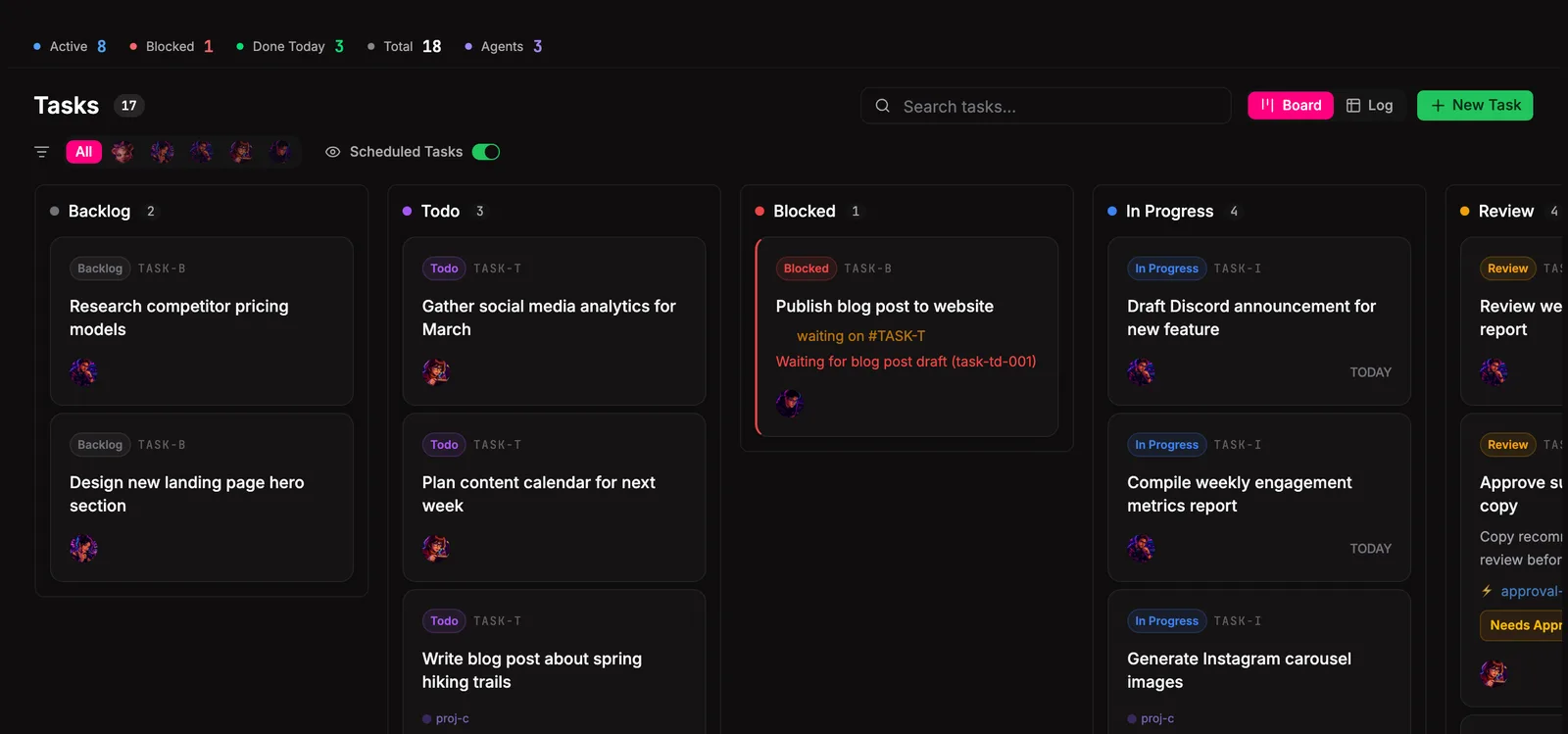
The board is the home view. Each column is a state, each card is a task. Drag cards between columns to move work forward. Click a card to open its detail panel and see the full history.
Task Management
Section titled “Task Management”Create a task
Section titled “Create a task”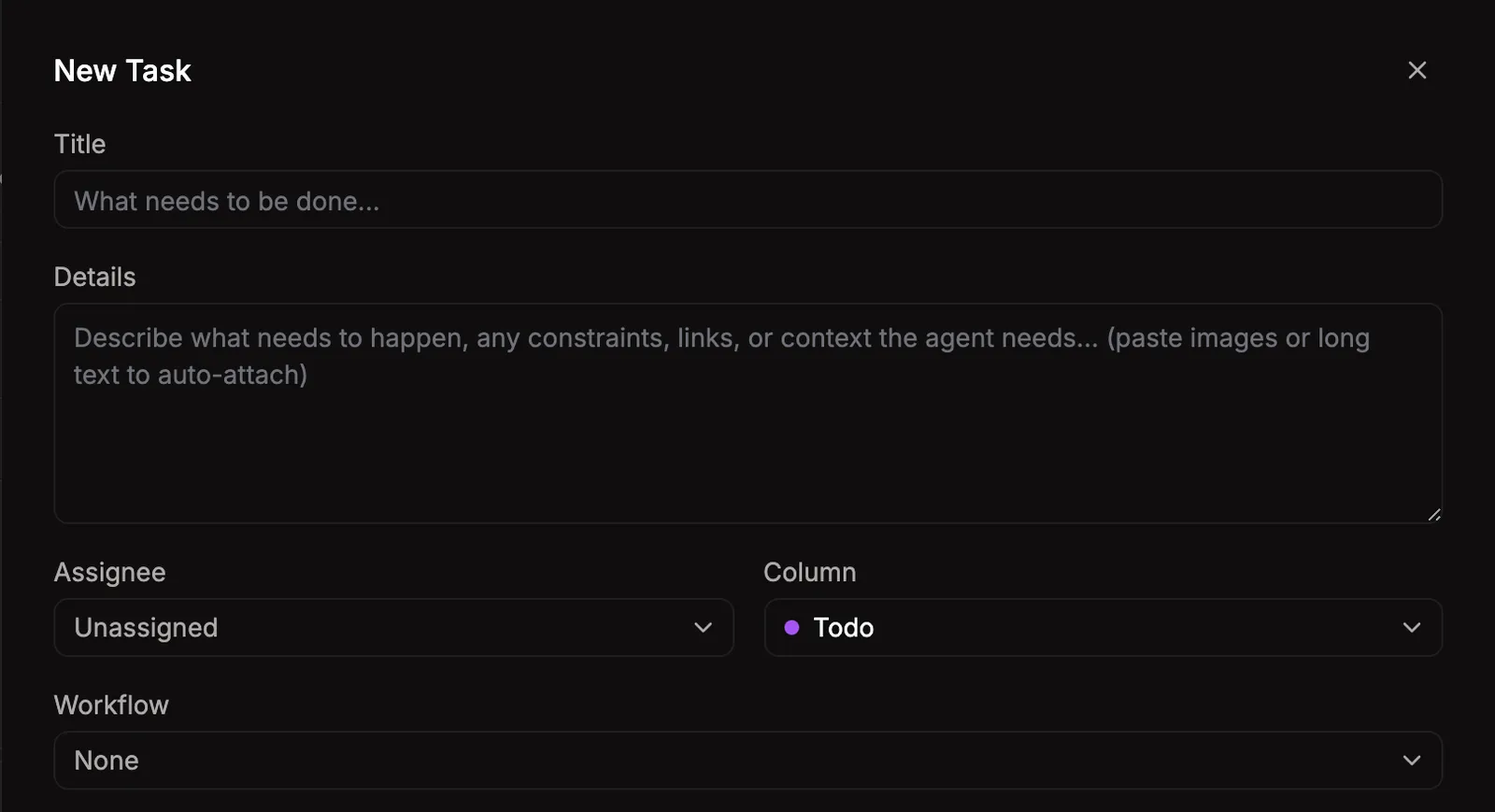
Hit + New Task in the top right of the board. Give it a title, pick an owner (an agent or yourself), and optionally attach a workflow. Workflows tell the assigned agent what kind of work this is.
Edit task details
Section titled “Edit task details”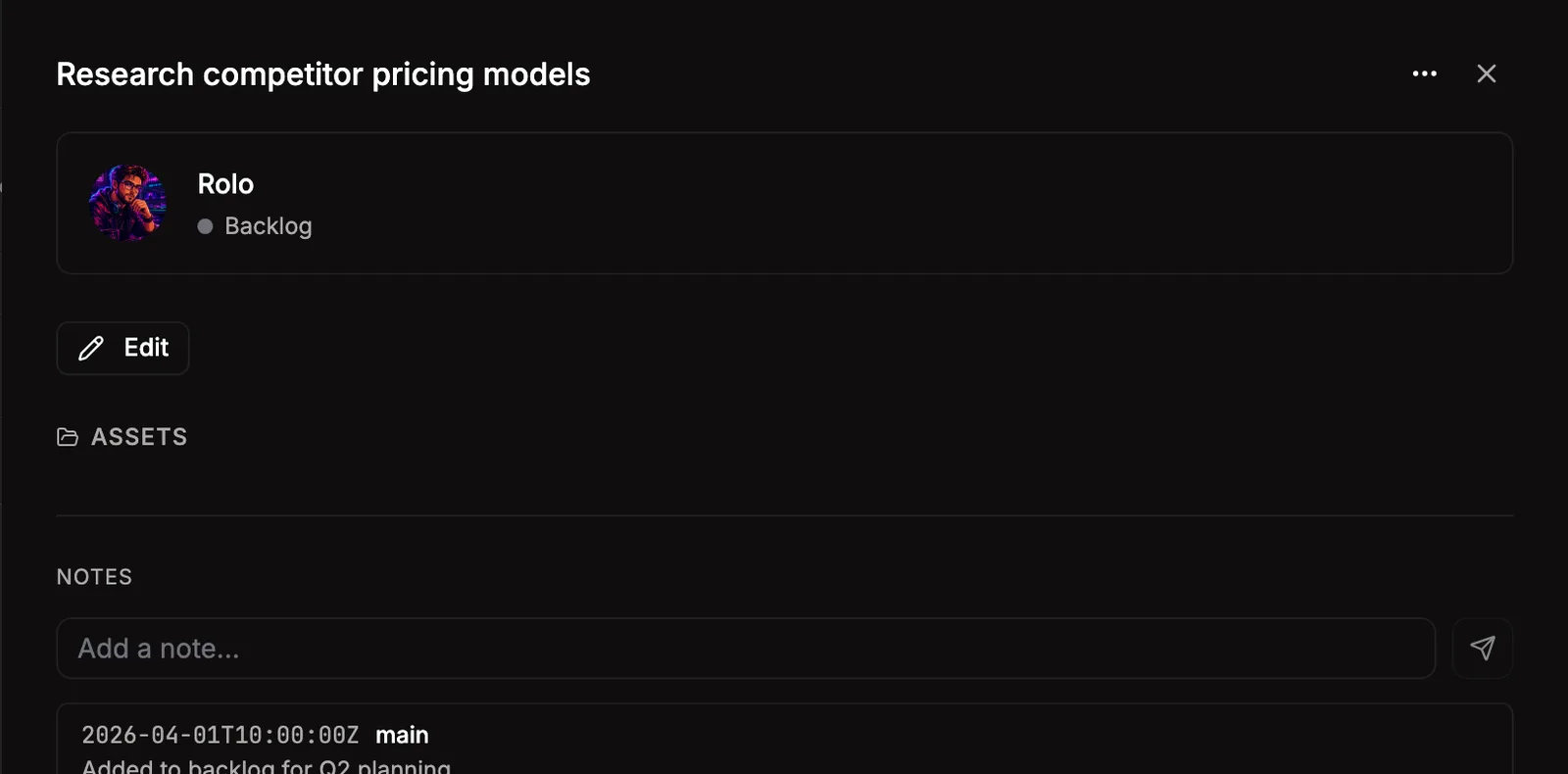
Click any card to open the detail panel. From here you can change the title, owner, column, dependencies, and append to the activity log. The log captures every state change and any progress notes from agents. It’s the audit trail that survives outside chat history.
Move tasks between columns
Section titled “Move tasks between columns”Drag a card to a new column, or use the column dropdown in the detail panel. Tasks can only move along allowed transitions. See Columns and transitions below.
Block and unblock
Section titled “Block and unblock”When a task can’t progress because it needs human input or another dependency, move it to Blocked and add a reason. Unblocking moves it back to its previous column.
Add dependencies
Section titled “Add dependencies”A task can depend on another task. The dependent task can’t leave Backlog or Todo until its dependencies hit Done. Set this from the detail panel under Depends on.
Complete and archive
Section titled “Complete and archive”Move to Done and add a one-line summary. The summary is what shows up in memory search later, so make it useful. Done tasks can be moved to Archived to clear them off the active board without losing history.
Delete a task
Section titled “Delete a task”Use the trash icon in the detail panel. Task deletes remove the task from the board; bakin trash is only for asset recovery.
Filtering and searching
Section titled “Filtering and searching”
The filter bar above the board narrows by column, owner, tag, or attached workflow. Filters are URL-synced, so you can bookmark or share a specific view.
Columns and transitions
Section titled “Columns and transitions”The seven columns and what they mean:
| Column | Meaning |
|---|---|
| Backlog | Captured but not yet approved or scheduled |
| Todo | Approved and queued for work |
| Blocked | Can’t progress, needs input or dependency resolution |
| In Progress | Actively being worked |
| Review | Work done, waiting for human approval |
| Done | Approved and complete |
| Archived | Cleared off the active board, history preserved |
Tasks move along a fixed state machine. Allowed transitions:
| From | To |
|---|---|
| Backlog | Todo |
| Todo | In Progress, Blocked, Done, Backlog |
| In Progress | Review, Done, Blocked, Todo |
| Blocked | Todo, In Progress, Backlog |
| Review | Done, In Progress, Todo |
| Done | Archived, Todo, In Progress |
| Archived | Done, Todo |
CLI moves and agent calls go through the same state machine.
Settings
Section titled “Settings”| Setting | Type | Default | What it does |
|---|---|---|---|
| Default column | select | todo | Which column new tasks are created in |
| Show completed tasks | boolean | true | Show tasks in the Done and Archived columns by default |
| Auto-archive after (days) | number | 0 | Move completed tasks to archive after this many days. 0 to disable. |
| Max in-progress tasks | number | 5 | Warn when more than this many tasks are in progress |
From the CLI
Section titled “From the CLI”Same operations are available from the terminal when you’d rather not click:
| Command | Purpose |
|---|---|
bakin tasks list [--column=<column>] | List tasks. |
bakin tasks get <id> | Get task details. |
bakin tasks create <title> [agent] [--workflow=<id>] [--no-workflow=<reason>] | Create a task. |
bakin tasks move <id> <column> | Move a task. |
bakin tasks log <id> <message> | Log task progress. |
bakin tasks block <id> <reason> | Block a task. |
bakin tasks depend <id> <dependsOn> | Register a task dependency. |
bakin tasks complete <id> <summary> | Complete a task. |
Full surface in the CLI reference.
HTTP API surface for this plugin: see the API reference.
For agents
Section titled “For agents”Agents drive tasks through MCP exec tools. The full set:
bakin_exec_tasks_assign: Assign a task to an agent.bakin_exec_tasks_block: Mark a task as blocked with a reason. Use when you cannot proceed.bakin_exec_tasks_complete: Report that your task is complete. Moves the task to Done and notifies the orchestrator.bakin_exec_tasks_create: Create a new task on the task board. Workflows are auto-matched by title when workflowId is not provided. Provide workflowId to force a specific workflow, or skipWorkflowReason to explicitly skip.bakin_exec_tasks_delete: Delete a task from the board.bakin_exec_tasks_get: Get details about a task — title, description, current column, logs, dependencies, project context.bakin_exec_tasks_list: List all tasks on the board. Optionally filter by column or agent.bakin_exec_tasks_log_progress: Log a human-readable progress update to the live activity feed. Call this at every significant step.bakin_exec_tasks_move: Move a task to a different column on the task board.bakin_exec_tasks_set_dependency: Register a dependency between tasks. Your task will be auto-re-dispatched when the dependency completes. After registering, exit — do not wait.bakin_exec_tasks_update: Update a task on the board — change title, description, or assigned agent.
Full schemas and arguments in the Exec tools reference.